- BSC Lot Exchange - 

Quality SimCity 4 Custom Game Objects 
For the SC4 Community by the SC4 Community.

Trans.gif (54 bytes)
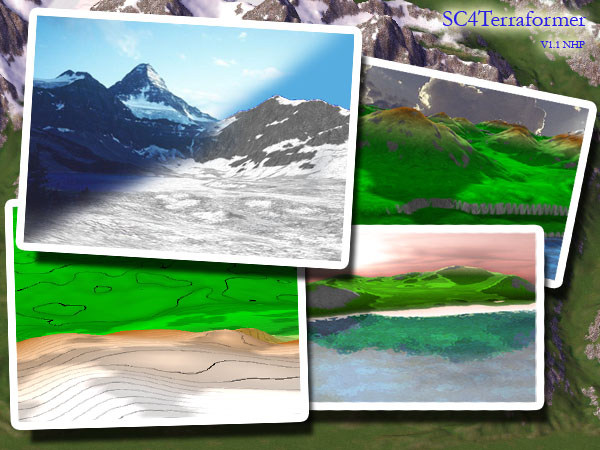
SC4Terraformer v11
LotLink

http://sc4devotion.com/csxlex/lex_filedesc.php?lotGET=731


Read Review

Lot Details:

Creator : wouanagaine Upload Date : 2007/04/17
Last Update : Never File Type : Tools - Player
View Count : 1280 Category : Tools - Data Creation
Last Download : 2013/05/19 Downloads : 39088


Lot Description:
Compatibility - Sc4Terrafomer only works with Rush Hour and the Deluxe Edition. Only for WinXP

DirectX - Microsoft directx team releases a new version about every two months so you should be sure you have the latest version. At the moment you need the april 2006 version of directx 9.0c

You can download directx from the following locations: http://www.softwarepatch.com/windows/directx.html
or
http://www.microsoft.com/windows/directx/default.mspx

By downloading DX, you will have an exe in your HD, run it, it will ask you for a destination folder, enter c:\dx You will need to run the DXSetup.exe from c:\dx

MSCVP71.DLL - Some users may need this file. ( in case of error at startup ) It can be found here:
http://www.dll-files.com/dllindex/dll-files.shtml?msvcp71

This is an external program and does not change anything within simcity.

Please note you use this program on your own risk, you should make a backup of your region and read the included readme.html

unzip in a new folder keeping the folder structure, and run SC4Terraformer.exe

This is not the same version as the one which can be find at Mods&Downloads at ST, but it is the same as the one which can be found in the SC4TF Development thread at ST

Changelog

v1.1
  • Compressor tool, that will allow you to stretch/shrink the elevation of the whole region ( credit to beskhu3epnm )
    • when the dialog shows up, the min and max value of the actual terrain are shown in the edit box
    • enter your new numbers ( min < max )
    • if you leave the 'unchanged value' to 0 then the full range will be mapped to the new one using the same scaling factor
    • if you use another value ( should be between min & max ) the [min-pivot] will be map to [newmin-pivot] and [pivot-max] will be map to [ pivot-newmax]
    • this create some nice feature if you want to scale only above water terran ( enter 250 in the 'unchanged value, leave the min, just change your max )
  • New vertex shader that will display contour lines, only work for those who have a Vertex Shader 1.1 compatible GFX card
  • RGB colored scheme import/export ( credit to Moganite )
  • A raise & lower zone tool in Brush tools ( credit to JPlumbley )
v1.0c
  • Removed the water level dialog and tool
  • Generic exception handling in case of error while loading a region ( mainly RAM issues )
  • Windows positionning persitent accross multiple runs
v1.0b
  • SC4M file format enhanced to incorporate the config.bmp and html notes from the author
  • Create region dialog can now accept a new SC4M instead of the width by height values
  • On creation or import of a SC4M , the author notes are displayed
  • Bug fixes with readonly/only save modified related issues
  • On import, the min height values has been removed ( useless )
v1.0a
  • Supporting .TER file format importing
  • Sliders of min/max height inverted
  • Readonly files has been handled
  • Only saving modifying cities


Comments

toxicpiano The directx 9 version won't work for me, (using vista) is there any chance of a dx10 compatible version?
2007/04/17
wouanagaine maybe, I've just received a new PC with Vista, so when I 'll have time ( and I don't have for now ) I'll look into this
2007/04/17
Serkanner One of the greatest addition for the game ever finally available on the exchange. Thank you very much for creating this fantastic program and sharing it with us all.
2007/04/17
dioangel downloaded the thing along with the directx (yes I have Vista on the new pc) didn't work.
2007/04/17
wouanagaine DioAngel, I said in the compatibily that is is WinXP only
2007/04/18
SpartanB292 Mat i ask how this version is different from the last? I'd like to know before i dl it
2007/04/18
dioangel I understand..my bad
2007/04/18
wouanagaine SpartanB292, I updated the description
2007/04/19
Scififan68 I have vista and it worked fine for me. A very useful tool.Thanks
2007/06/03
Paris Got this a while ago, back to say thanks. Anything that speeds up the process between creating a map and being run out of town by a lunch mob has my vote.Great tool, don't know how I played without it for so long.
2008/01/15
Maxprizm Downloaded this today, I get the error, ImportError: MemoryLoadLibrary failed loading tools3D.pyd /shrug
2008/07/27
Maxprizm Nvm, I needed the system .dll file. Great program.
2008/07/27
dunball ahhhhh why won't you work keeps coming up with a startup error...little help?
2008/10/10
Hitoz wont work on vista.
2008/12/19
TIR669 Thx ;)
2008/12/20
Argon Vex If I use version 1.1, al my flat land is black instead of green. Same for flat seabed. Slopes appear in the proper color though. Does anyone know what causes this?
2009/01/15
NikoBellic2334 i don't like your programs anymore
2009/02/20
Rouche I've VISTA .... pff
2009/04/13
wouanagaine Why don't you post on the support thread is behind my comprehension
2009/04/14
richardhekimyan Only think I have ever seen so far that works with XP and not Vista.
2009/04/25
colBoh I have the same problem with Argon Vex. Flat land looks black instead of green. I don't remember it doing this the last time I downloaded. Help!
2009/10/06
johnny2bad73 all we need are the config and the greyscale ...no need for a program to get a region ..i can't use the tool either ....you replace the config ,change greyscale to a jpg, open up box with ctrl+alt+shift+r and upload greyscale jpg to the config and region folder.....why have another program installed ?
2009/10/08
Delecto I feel your pain Wouanagaine, all these disrespectful comments when you spent hours to make this great tool. It works like a charm for me, but of course I'm on XP. Thank you so much!
2009/10/26
palmtown thank you very much !! :D
2009/12/27
simcity4mayor I wish this also had Vista and 7 compatibility, but not to take away from the tool itself. It's a great thing.
2010/01/12
Snitchie Tanks :D Making regions just became better :)
2010/01/24
earwaxman Awesome tool :D
2010/03/16
brandbrand32 thanks
2010/04/25
Exodia the forbidden one brilliant!
2010/06/05
FlyHigh the download of the .dll seems to be broken. Could you please post a new one?
2010/06/16
FlyHigh Sorry. It does work, my bad ;)
2010/06/16
Xperian Tried it on Vista, works fine.
2010/07/24
lokex so laggy
2010/08/09
cuddlyewok Works a treat - many thanks indeed
2010/08/21
guy Does this work with windows 7?
2010/08/23
Gotham I have Vista. The guidelines for the installation of a map says that I have to import the grayscale into the SC4TF. First of all, the only relevant option the program has is "Open Region" and that just searches for folder, not specific files. And can we get a link to the support thread? Because I dont see any.
2010/08/31
Gotham I have Vista. The guidelines for the installation of a map says that I have to import the grayscale into the SC4TF. First of all, the only relevant option the program has is "Open Region" and that just searches for folder, not specific files. And can we get a link to the support thread? Because I dont see any.
2010/08/31
bean32 i have win7 and because there is no utility (such as this one) that works on my OS, i cannot use .SC4M files
2010/09/20
ocket6 aw i read the description and i have Windows 7
2010/10/22
Lethal mayor At long last! terraforming that doesnt get you frustrated! Im totally downloading this! Thank you so much wouanagaine! ^_^
2010/12/13
IwantSC5 I have no idea how to convert maps, or even use this application..I read the readme :/ Any help?
2011/01/14
michaelg95 Umm.... I just downloaded... seems confusing. Wouanagaine are you able to help me. Please. I dont understand what you said about backing up your region. Is it the region in TF or ALL your SC4 regions?
2011/02/01
mikedocmll When I press the icon to start up SC4Mapper or SC4Terraformer this is what happens: with SC4Mapper I get the program flash bar and nothing else, it shows up in processes but not in applications if I start the Task Manager, but the program will not open in a screen on the desktop, same with SC4Terraformer, I use Windows 7 64bit, any help would be appreciated!
2011/02/23
thegiant27 MAN MAN, YOU ARE NOT RIGHT! FOR WINDOWS XP?
2011/03/14
aartt It keeps giving an error where it want me to open SC4Terraformer.exe.log and it says "Traceback (most recent call last): File "SC4Terraformer.py", line 1, in ? File "zipextimporter.pyo", line 78, in load_module File "SC4TerraformerApp.pyo", line 3, in ? File "zipextimporter.pyo", line 91, in load_module ImportError: MemoryLoadLibrary failed loading tools3D.pyd " please help D:
2011/05/11
aartt It keeps giving an error where it want me to open SC4Terraformer.exe.log and it says "Traceback (most recent call last): File "SC4Terraformer.py", line 1, in ? File "zipextimporter.pyo", line 78, in load_module File "SC4TerraformerApp.pyo", line 3, in ? File "zipextimporter.pyo", line 91, in load_module ImportError: MemoryLoadLibrary failed loading tools3D.pyd " please help D:
2011/05/11
cfletch13 I get the following error in the log: Traceback (most recent call last): File "SC4Terraformer.py", line 4, in ? File "zipextimporter.pyo", line 78, in load_module File "SC4TerraformerApp.pyo", line 3, in ? File "zipextimporter.pyo", line 91, in load_module ImportError: MemoryLoadLibrary failed loading tools3D.pyd Any fix?
2011/05/12
Vainakh Thanks for this amazing program, ignore the haters. I use Win7 and I manage to make this work. Use a WinXP shell, get creative. Always a way.
2011/05/24
ocket6 im using win7 and it works fine
2011/05/26
klambaerk I'm running Vista Home Premium. Downloaded the other Terrain mod first (coz I don't read before I act) and had the problem of not getting past Splash Screen. This one works a charm though. Beautiful Mod mate!!!
2011/05/28
Runnerguy347 I keep getting a direct x error, its kinda frustrating
2011/09/08
Plan_design_build78 Is there a Mac version for this? If so, where can I get it? Much appreciated.
2011/09/10
LolloLallo doesn't work on windows 7 64 bit!
2011/09/11
Waterstar Odd, this worked on my Win 7 in an older update
2011/09/18
tarmiji thanks
2011/11/16
SamusLife@yahoo.com Thank you! :)
2011/12/01
JDOG4546 Would there be a way for this to be compatible with windows 7, or is that completely out of the question?
2011/12/29
Zeta. Agafa els patos que be riuaaaa`!!!
2012/01/06
Frizzon it works fine on win 7
2012/01/07
prince_amy sweet
2012/01/31
Waterstar It works on Vista and 7, put the app on Windows XP compatabilty mode!
2012/02/06
torpeniczel Hello I add a little trouble running this on win7, so I did this : read the readme, download the direct x thing and install it in c:\dx, go there, run the exe, run sc4terraformer (compatibility mode) : it works ! Hope this can help.
2012/03/11
SvenBoogie Confusion... if you use 'save image' to save an image of a region, then import that same image back to the program, it completely ***ks up the entire region... um... why...
2012/03/28
vishals730 love it
2012/04/19
nekomaster SC4 Terraformer never works for me, even when I had Win XP. I'm using Windows 7 on my main pc and Windows 8 on my netbook, and neither work with this... and why is it still made to work with XP only? XP is getting very old
2012/04/23
Andrew_C It took some effort, but I got this working under Win 7 64 bit. It absolutely requires msvcp71.dll (you can stick it in the SC4T directory) and of course DirectX 9c. Another thing that tripped me up is that very time it starts up you HAVE to choose a region for it to open. You dont have to edit it, you can create a new region and edit it, but you have to choose a region to open, which is annoying
2012/05/12
dfnwv Everytime i try to get this to install, it gives me the pythondll error, I am using Vista 32-bit, Does any know how to fix this?
2012/05/30
dfnwv I have DirectX 9.0C (June 2010 edition), MSVCP71.dll, And i've even tried XP Compatability mode, It still gives me the pythondll error! If i have no idea to fix this, I am going to bang my head against the wall!
2012/05/30
Panther559 Have Win7 and it's giving me the error message, even tried it with the MSCVP71.DLL, yet still nothing.
2012/07/22
Panther559 Even tried WinXP Compatibility Mode, and STILL nothing.
2012/07/22
TonyNobo thanks
2012/08/17
jevon123 Didn't work on Windows 7 at all. File "DlgCities.pyo", line 310, in RebuildConfig: ZeroDivisionError: float division.
2012/08/28
daltro12 For Vista/7 users, use the DirectX SDK, works fine!!
2012/09/07
savit thanks
2012/10/06
Ravana "Only for WinXP" Heeeere we go...
2012/10/21
Ravana Are you kidding me? This only works with DX9 and no higher versions? Why are all the mapper utilities completely archaic and counter-intuitive? This is painful to watch, it really is.
2012/10/21
rajpoot thanksS
2012/10/30
AndersL Does not work with Windows 7...
2012/10/31
st_timmy544 If you want to get it working on Windows Vista, 7 or 8, try using this guide: http://pastie.org/private/xkvstsfcpscx8ayvlw
2012/11/09
jaredtreasurehodge If the program doesn't work with Windows 7, run the program in compatibility mode.
2012/12/01
Phunkadelic77 I recently reinstalled SC4 after a taking a long hiatus from the game - I used to actually hate SC4, but now with all that's available on the BSC and STEX, etc - I've found a new way to enjoy it! I am impressed with the quality of a lot of the stuff I find here and furthermore, I am inspired by the pure creative genius I see at work when I implement something like the SC4 Terraformer or SC4 Mapper tools. Thanks so much guys!
2012/12/11
Sim5810 Can it work if the compatibility mode is in Win XP SP?
2012/12/15
cswj999 I just get the splash and it doesn't open.
2012/12/22
ModyMentos If you want to get it working on Windows Vista, 7 or 8, try using this guide: http://pastie.org/private/xkvstsfcpscx8ayvlw but put the dll in this folder: C:\windows\SysWOW64 Sory for my english i want to help
2013/01/20
xGreg8 ModyMentos thanks for the info. Worked like a charm!
2013/01/20
soulbooth How can I download this?? I am a registered member but can't find the download link.
2013/02/19
bardya_oracle Thank you.
2013/03/10
Zolarius There is a problem with the program. It won't work and the Library zip files reports back as corrupt. Could you please look into this issue. Thanks
2013/03/30
Flatron I have the same problem. I would really like to use it, but it doesn't work. Even if I make a batch file like it was possible for the old version of the mapper.
2013/04/06
Flatron Edit: now it works!
2013/04/06


Trans.gif (54 bytes)

Close this window ...

SimCity 4 is a registered Trademark and belongs to Electronic Arts
Custom Game Objects is produced partially by using Maxis Toolkits
BSC is a group of designers in a loose association.
At no instance or occassion does the BSC intend to infringe on rights of Electronic Arts or Maxis.

 Access to this Exchange is a privilige and not a right. Please abide by the Exchange Rules and have fun.


Copyright CSX WebTools